Why Every Data Team Is Talking About AI SQL Generators in 2026
An ai sql generator is a tool that converts plain English into working SQL queries — no coding required.
Here's a quick breakdown of the top options and what they do:
| Tool Category | Best For | Starting Price | Schema-Aware |
|---|---|---|---|
| Dedicated SQL AI Assistants | End-to-end SQL workflows | Free tier available | Yes |
| IDE-Integrated AI | Developers in IDEs | $10/month | Partial |
| General-Purpose LLMs | Simple, one-off queries | Free / $20/month | No |
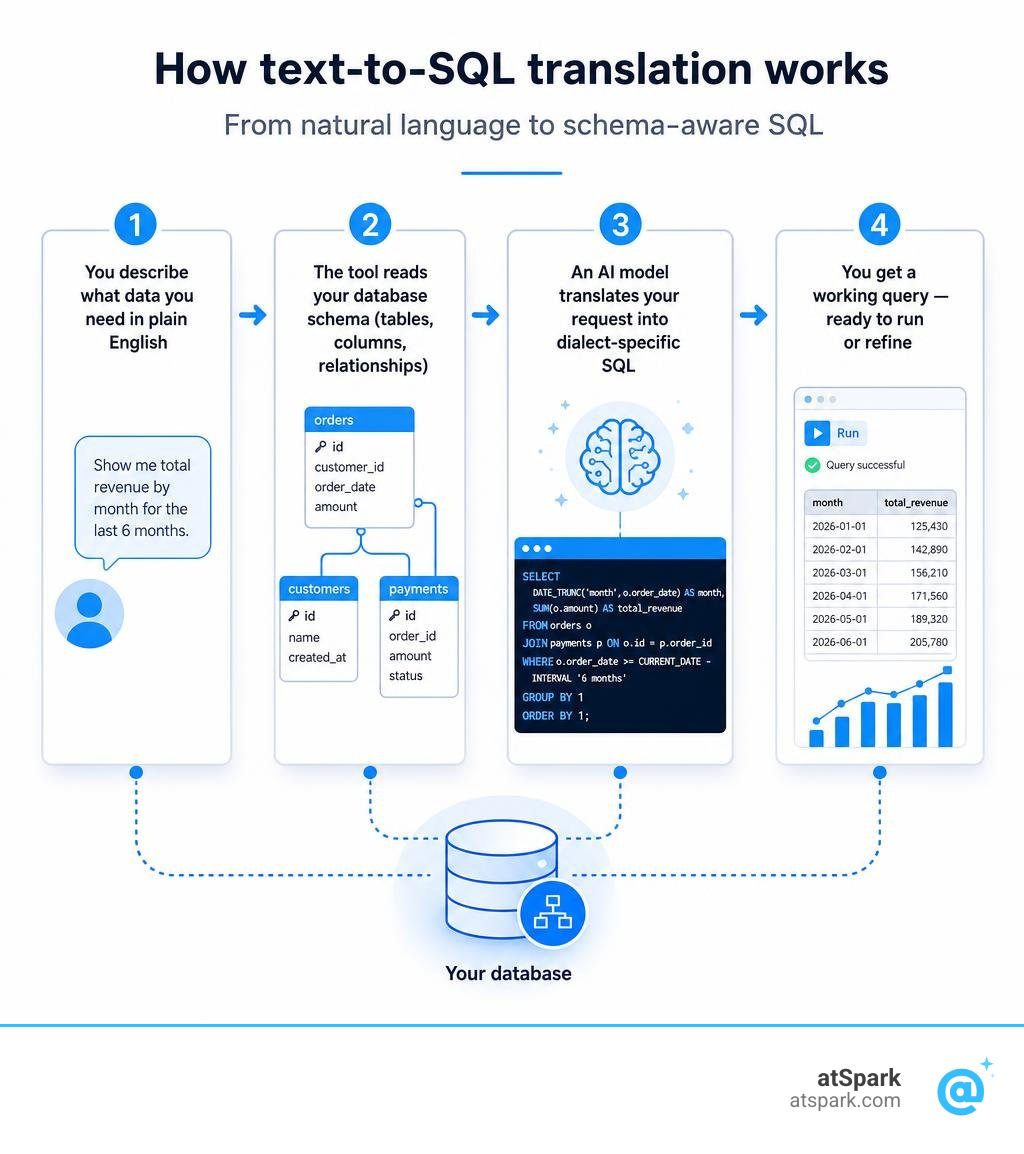
How AI SQL generators work, in four steps:
- You describe what data you need in plain English
- The tool reads your database schema (table names, columns, relationships)
- An AI model translates your request into dialect-specific SQL
- You get a working query — ready to run or refine
SQL is still the language of data. Every revenue dashboard, every retention report, every pipeline metric eventually comes down to a query. But writing SQL from scratch is slow, error-prone, and requires specialized knowledge that most finance and RevOps teams simply don't have sitting around.
The problem is real: you need to know right now whether net revenue retention is trending down — and your data team's queue is three days long.
By 2026, AI SQL generators have matured well past simple chatbot wrappers. The best tools today connect directly to your database schema, understand your actual table and column names, and generate accurate, production-ready queries in seconds. Schema awareness has become the single most critical factor separating tools that actually work from tools that confidently hallucinate column names that don't exist.
For teams without dedicated SQL expertise, that shift changes everything.
Understanding the Mechanics of an AI SQL Generator
At its core, an ai sql generator acts as a bridge between human language and machine-readable database commands. It takes the messy, conversational way we ask questions and translates it into the rigid, highly structured syntax of SQL.
But how does this transition happen without breaking your database? It relies on a combination of Large Language Models (LLMs), Natural Language Processing (NLP), and deep contextual understanding of database structure.
How an AI SQL Generator Processes Natural Language
When you type a question like "Who are our top 10 customers by revenue last quarter?", the AI does not just do a simple keyword search. Instead, it initiates a complex multi-step processing sequence:
- Parsing and Tokenization: The AI breaks down your sentence into individual semantic tokens to understand the grammatical relationships between words.
- Intent Extraction: It determines the core analytical task. For example, "top 10" signals an ordering operation (ORDER BY) combined with a threshold (LIMIT 10). "Last quarter" signals a temporal filter (WHERE date is between specific bounds).
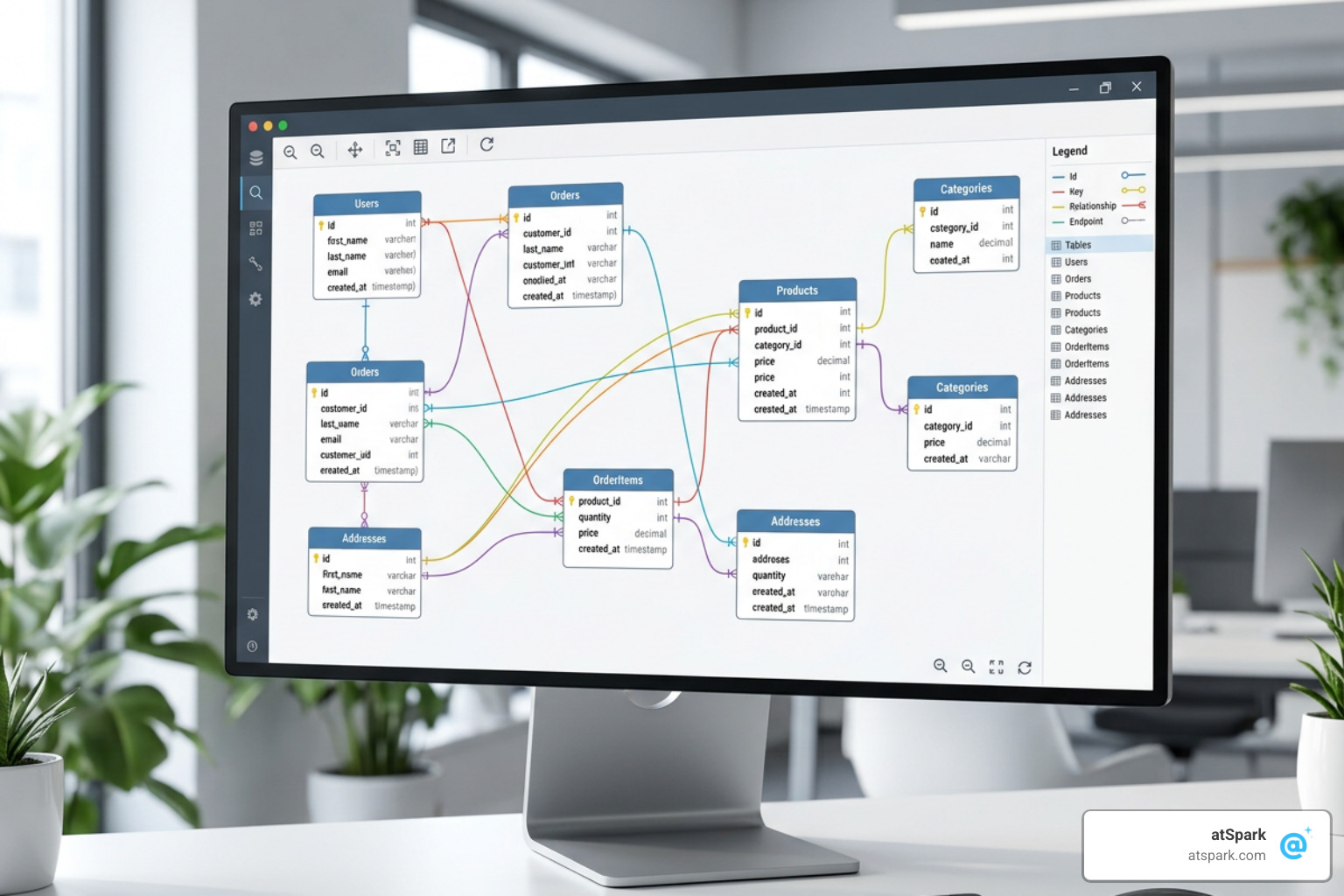
- Schema Alignment: This is where the magic happens. The generator maps your abstract business terms ("customers", "revenue") to the actual tables and columns in your database schema (e.g., mapping "customers" to the "users" or "organizations" table, and "revenue" to the "amount" column in the "invoices" table).
- Dialect Translation: Finally, the AI structures the query using the precise syntax rules of your specific target database, whether that is PostgreSQL, MySQL, BigQuery, or Snowflake.
Key Features to Look For in an AI SQL Generator
If you are evaluating different tools for your team, you should look beyond a basic text box. A production-ready SQL AI assistant needs to support your entire development and analysis lifecycle. Here are the essential features to keep on your checklist:
- Direct Schema Importing: The tool must be able to read your database's DDL (Data Definition Language) or connect directly to import table structures.
- Multi-Dialect Support: It should effortlessly switch between PostgreSQL, MySQL, SQL Server, Oracle, Snowflake, and BigQuery.
- Query Explanations: The AI should provide a step-by-step breakdown of what the generated query actually does, helping non-technical users learn and verify the logic.
- Performance Optimization: Look for tools that can analyze existing slow queries and suggest index-aware rewrites.
- API and Integration Access: The availability of REST APIs or Model Context Protocol (MCP) servers allows you to integrate SQL generation directly into your internal tools and workflows.
Schema Awareness, Accuracy, and Handling Complex Queries
The earliest iterations of AI coding assistants suffered from a major flaw: they were completely blind to your database's unique structure. When you asked a general-purpose chatbot to write a query, it had to guess your column names. The result was a constant stream of syntax errors and "column does not exist" messages.
In 2026, schema awareness is the gold standard. By feeding the AI your exact database schema, the accuracy of generated queries skyrockets.
| Feature / Metric | General-Purpose AI (e.g., ChatGPT Basic) | Schema-Aware AI SQL Generator |
|---|---|---|
| Column Name Accuracy | Low (Guesses names like "full_name") | High (Uses actual names like "firstname", "lastname") |
| Relationship Mapping | Poor (Struggles to join multiple tables correctly) | Excellent (Understands foreign keys and join paths) |
| Standardized Test Accuracy | ~72% without pasted schema | 85% to 95% (Scored up to 90%+ across standard benchmark queries) |
| Query Safety | None (May write destructive queries) | High (Blocks write operations, wraps in dry-run transactions) |
Handling Large Database Schemas with Hundreds of Tables
For small databases with five or ten tables, pasting your schema into a prompt works fine. But what happens when you are dealing with enterprise data warehouses containing hundreds of tables and thousands of columns? Standard LLM context windows quickly become overwhelmed, leading to slow response times, high API costs, and degraded accuracy.
Advanced schema-aware tools solve this by supporting databases with 900+ tables without exhausting AI context windows. They achieve this through smart schema-aware context loading. Instead of sending your entire database blueprint to the AI with every question, these systems use semantic search and metadata filtering to identify and send only the relevant tables and relationships needed for that specific query.
If your schema is exceptionally large, a great developer workaround is to extract only the relevant tables using utility commands like pg_dump with the schema-only flag, keeping your input clean and focused.
Generating Complex Queries: CTEs, Window Functions, and Recursion
Can an ai sql generator handle advanced data science and engineering tasks, or is it limited to basic SELECT statements?
Modern database assistants are highly capable of generating complex, multi-layered queries. Because they are trained on millions of real-world database scripts, they understand advanced concepts like Common Table Expressions (CTEs), window functions (such as SUM OVER and ROW_NUMBER), and even recursive queries.
For example, if you ask for a running total of weekly revenue, a schema-aware tool will automatically generate a query utilizing window functions to aggregate sales sequentially. If you ask to calculate your monthly subscription churn rate, the AI can construct a clean, readable query using multiple CTEs—first calculating active users, then identifying churned users, and finally dividing the two to yield a precise percentage.
Database Compatibility, Security, and Safe Production Access
A great tool is only useful if it actually speaks your database's language and respects your security protocols. Let's look at how these generators interface with different database engines and how they protect your most sensitive asset: your data.
Protecting Sensitive Data and Schema Privacy
When connecting an AI tool to your business infrastructure, security is paramount. Many organizations have strict compliance policies that prevent them from sending customer data to third-party cloud APIs.
Fortunately, modern AI SQL generators are designed with a privacy-first architecture. Privacy-focused tools offer desktop applications or local execution options. In this setup, your actual database records never leave your local machine. The system only processes metadata—meaning table and column names—to construct the SQL statement.
Further, some open-source or self-hosted models allow for zero cloud dependency, ensuring that both your queries and your schemas remain entirely within your private network.
Safe Execution and Write-Blocking Guardrails
Running AI-generated code directly against a production database sounds like a recipe for an accidental disaster. What if the AI generates a destructive command that deletes active user accounts?
To prevent these nightmare scenarios, top-tier SQL assistants employ multi-layered safety guardrails:
- Read-Only Enforcement: Advanced database gateways enforce read-only access at the network level, physically blocking commands like INSERT, UPDATE, DELETE, or DROP from ever reaching your production database.
- Transaction Wrapping: Secure SQL assistants wrap potentially destructive queries in transaction blocks (BEGIN...ROLLBACK). This allows you to dry-run the query, preview the affected rows, and safely verify the results before committing any changes.
- Row Budget Truncation: To protect database performance from runaway queries, modern database adapters enforce strict limits (e.g., capping results at 1,000 rows or 12,000 cells) at the database adapter level.
Optimizing, Troubleshooting, and Integrating SQL Workflows
Writing a query that runs is only half the battle; writing a query that runs efficiently is where true database mastery lies. AI SQL generators have evolved into complete workspaces that help you debug, optimize, and collaborate.
Fixing Broken SQL Queries Instantly
We have all been there: you write a complex 50-line query, hit run, and get a generic syntax error. Debugging these issues manually can waste hours of development time.
With an AI SQL assistant, you can paste your broken code directly into a query fixer. The AI detects syntax errors, catches wrong JOIN configurations, and flags database-specific quirks (such as converting PostgreSQL-specific JSONB queries to standard MySQL JSON formats). It provides instant corrections alongside a clear explanation of what went wrong, turning frustrating debugging sessions into quick teaching moments.
Performance Tuning and Index-Aware Rewrites
Slow-running queries clog your database queues and inflate your cloud warehouse bills. Traditional optimization requires analyzing execution plans (EXPLAIN) and understanding index structures.
Advanced SQL AI platforms provide automated performance optimization suggestions. By analyzing your query structure and schema metadata, the AI can:
- Identify index-friendly patterns (such as placing WHERE clauses on indexed columns first).
- Suggest index-aware rewrites to replace slow subqueries with efficient JOINs.
- Provide a side-by-side diff view to compare the original and the AI-improved SQL, complete with clear reasoning for every performance change.
IDE Integration and Developer Workflows
For software engineers and database administrators, leaving the code editor to generate a query in a web browser ruins productivity. That is why IDE integrations have become so popular.
If you are a developer working in VS Code, tools like GitHub Copilot or dedicated database IDE plugins (such as JetBrains AI in DataGrip or DBeaver AI) provide seamless, in-flow autocomplete. As you type a partial SQL statement, the AI analyzes your local migration files and project context to suggest complete JOIN clauses and complex filters on the fly.
For custom enterprise workflows, leveraging a public REST API allows your team to build custom conversational interfaces directly inside your own internal business intelligence tools.
Frequently Asked Questions About AI SQL Generation
What is the pricing range for AI SQL tools, and are there free options?
Pricing for AI SQL generators varies depending on your team's size and security requirements.
For individual users and light testing, there are excellent free options available. You can use free online SQL generators that offer a daily token pool without requiring a credit card, or explore the free tiers offered by various dedicated SQL utilities.
For professional and team plans:
- Entry-level plans start at a highly accessible $5 per month, often offering a 7-day free trial across all tiers.
- Professional plans are typically priced around $20 USD per month (billed annually), which provides unlimited messages and API access.
- Enterprise-grade tools with advanced security pipelines generally start around $29 per month.
How do AI SQL generators compare to traditional SQL learning methods?
Instead of replacing learning, AI SQL generators actually accelerate it. Traditional learning requires memorizing syntax rules, reading dry documentation, and searching through outdated StackOverflow threads.
Using an AI SQL assistant is like having an expert database administrator sitting next to you for pair programming. By using the "Explain" feature on generated queries, you can see exactly how complex clauses, window functions, and joins work in real-time on your own data. It bridges the gap between theory and practical application.
What are the limitations of current AI SQL generators?
While modern AI SQL tools are incredibly powerful, they are not a complete replacement for human database engineers. Their primary limitations include:
- Lack of Tribal Knowledge: The AI understands your schema, but it does not know your unique business logic unless you explicitly define it. For example, it won't know that "active customer" in your company requires three specific subscription conditions unless you write those rules into the prompt or data source guidelines.
- Edge-Case Debugging: Extremely complex database migrations, performance tuning on petabyte-scale warehouses, and deep architectural decisions still require human expertise.
- Hallucination Risks: If a schema is not provided or is poorly defined, the AI will still attempt to write a query, potentially inventing table structures that do not exist.
Conclusion
The landscape of data analysis has shifted dramatically. In 2026, writing SQL from scratch is no longer a prerequisite for extracting valuable business insights. AI SQL generators have democratized data access, allowing product managers, marketing teams, and executives to bypass engineering bottlenecks and get answers in seconds.
But what if you could take this a step further? What if you didn't have to look at, copy, or execute SQL queries at all?
While an ai sql generator is an incredible tool for developers and database administrators, business teams often don't want a SQL query—they want the actual answer. They want a clean chart showing monthly revenue trends, a table of churned accounts, or a quick insight they can drop into a slide deck.
This is where atSpark comes in.
Instead of just generating code for you to run elsewhere, atSpark is an AI-powered conversational analytics platform designed specifically for SaaS companies. We unify your billing, CRM, and subscription data into a single, governed workspace.
With atSpark, you don't need to import schemas, debug syntax errors, or manage database connections. You simply ask plain-English questions and get instant, beautifully formatted charts, tables, and insights. It is the ultimate solution for teams who want to Ask Your Data Anything Without SQL.
Ready to transform how your SaaS team interacts with data? Explore our resources to learn more:
- Discover how automated analysis can supercharge your growth with our guide on What is AI Revenue Analytics.
- Prepare your team for success by reviewing the 5 Questions AI Revenue Analyst Day One.
- Build a single source of truth for your business metrics using our unified SaaS KPI Dashboard.